Start a blog, portfolio or business website on NVMe storage. Plesk and WordPress Toolkit support installation and updates, while nginx + Apache serve website traffic. SSL and daily backups are included. We can migrate an existing site at no extra migration charge. Using another platform? See our web hosting.
WordPressWorking on a websiteDoSieci.pl · technical assistance
WordPress plans
Plans for your website
Choose resources for a blog, business website or several sites. Compare storage for files and email, and the limits needed by the theme, plugins and background tasks.
WordPress Start
WordPress installation tools for a small website or blog.
PLN 10first year
Standard price: PLN 129 / year
Free 14-day hosting trial — decide before you pay.
10 GB NVMe100% NVMe: website files, email and the database all use the same NVMe storage, without a slower storage tier in the background.100% NVMe: website files, email and the database all use the same NVMe storage, without a slower storage tier in the background.files, email and database on the same storage
Unlimited data transfer
Free hosting migration
Domains: up to 50
Unlimited email accounts
Unlimited databases and FTP accounts
Included
CPU limit: 100%
2 GB RAM
SSH accesscoming soon — availability is being expanded
PHP 7.4–8.5, selected in the panel
nginx + Apache, OPcache
Free Let's Encrypt SSL
Imunify360
Anti-DDoS protection at infrastructure level
WordPress Toolkit
Ranker — 3 Google search queriesweekly rank checks and email reports · how it works
Most popular
WordPress Grow
WordPress hosting for a growing business website.
PLN 20first year
Standard price: PLN 225 / year
Free 14-day hosting trial — decide before you pay.
50 GB NVMe100% NVMe: website files, email and the database all use the same NVMe storage, without a slower storage tier in the background.100% NVMe: website files, email and the database all use the same NVMe storage, without a slower storage tier in the background.files, email and database on the same storage
Unlimited data transfer
Free hosting migration
Domains: up to 100
Unlimited email accounts
Unlimited databases and FTP accounts
.pl domain for PLN 0with an annual plan · renewal PLN 149 gross/year
Included
CPU limit: 200%
3 GB RAM
SSH accesscoming soon — availability is being expanded
PHP 7.4–8.5, selected in the panel
nginx + Apache, OPcache
Free Let's Encrypt SSL
Imunify360
Anti-DDoS protection at infrastructure level
WordPress Toolkit
Git
Ranker — 5 Google search queriesweekly rank checks and email reports · how it works
WordPress Agency
WordPress hosting for agencies and multiple websites.
PLN 30first year
Standard price: PLN 265 / year
Free 14-day hosting trial — decide before you pay.
80 GB NVMe100% NVMe: website files, email and the database all use the same NVMe storage, without a slower storage tier in the background.100% NVMe: website files, email and the database all use the same NVMe storage, without a slower storage tier in the background.files, email and database on the same storage
Unlimited data transfer
Free hosting migration
Unlimited domains
Unlimited email accounts
Unlimited databases and FTP accounts
.pl domain for PLN 0with an annual plan · renewal PLN 149 gross/year
Included
CPU limit: 400%
6 GB RAM
SSH access
PHP 7.4–8.5, selected in the panel
nginx + Apache, OPcache
Free Let's Encrypt SSL
Imunify360
Anti-DDoS protection at infrastructure level
WordPress Toolkit
Git
Laravel Toolkit
Node.js 24 and 26
Ranker — 10 Google search queriesdaily rank checks and email reports · how it works
One-click installation
Automatic backups
Security scanning
Free migration
What is included
What is included
01
Straightforward website management
WordPress hosting simplifies installation, updates, backups and website management. You get an environment configured for this popular CMS and support from a team familiar with its everyday challenges.
02
Resources for your theme and plugins
Your theme, plugins and background jobs determine how much CPU and RAM your website needs. We help choose the PHP version and resources for your existing site.
03
A carefully planned move
We migrate your existing website, check its PHP version, plugins and database, and test the copy before changing DNS.
Plesk management panel
WordPress Toolkit in Plesk
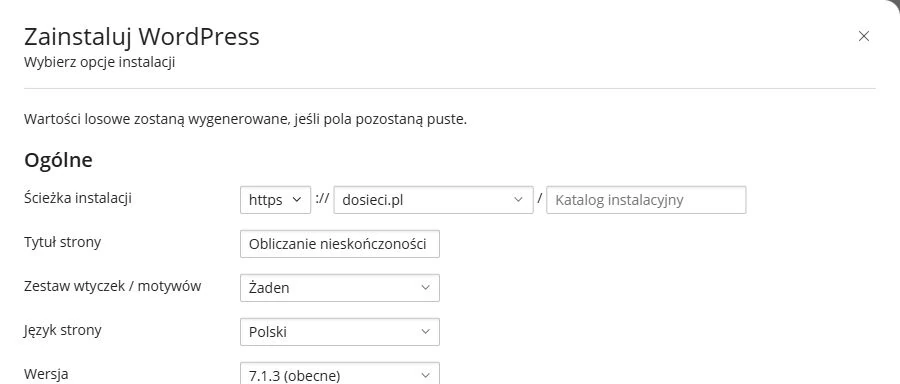
Plesk WordPress Toolkit installs WordPress, manages plugins and themes, configures updates, checks security settings and creates test copies. We can prepare WordPress with an agreed set of plugins to get you started.
✓Install WordPress from Plesk✓Plugin and theme sets✓Core and extension updates✓Cloning and staging✓Security settings checks✓Multiple installations in one view
Complex themes, visual editors, forms and WP-Cron jobs have different requirements. DoSieci.pl WordPress hosting combines server resources with tools for installation, updates and testing. We recommend a plan based on your website and its resource usage, rather than visitor numbers alone.
Choosing resources
WordPress runs on most hosting accounts, but compatibility alone does not mean the plan is a good fit. Complex themes, visual editors, forms, backups, WP-Cron jobs and security plugins can make extensive use of CPU, memory and the database. DoSieci.pl WordPress hosting combines NVMe storage with tools for installation, updates, testing and everyday management.
The service is suitable for a first website and for existing sites moving from another provider. We help choose the PHP version, check plugin compatibility and plan the migration so visitors can continue using your website.
01
PHP and caching in WordPress
WordPress builds pages using PHP code and database content. Files, email and databases use NVMe storage, while OPcache reduces repeated code compilation. Page caching can reduce the number of these operations on subsequent visits. In an nginx + Apache environment, its behaviour must be checked and adapted to forms, sign-in and plugins.
In the larger Performance and Pro plans we configure a separate Redis instance in a Docker container for object caching. Its WordPress connection is configured for your website. See how Redis works and how to check its connection. Theme and plugin code optimisation is a separate service; we agree on its scope before work begins.
NVMe, nginx + Apache and OPcache
WordPress tools in Plesk
Convenient PHP and SSL management
Access to logs, databases and backups
02
Migrating a live website
Migration involves more than copying wp-content. It requires all files, the database, correct connection settings and a compatible environment. After the move we check the website, administrator sign-in, forms, email delivery and key pages. For a store, we also test the cart, payments and integrations.
The domain is switched after the copy has been checked. For frequently updated websites, we synchronise the data again before changing DNS. This helps preserve content added after the initial copy.
Copy files and the database
Check URLs and the SSL certificate
Test the dashboard, forms and email
Final synchronisation before the DNS change
Moving files and data between environments.
03
Updates, backups and security
Common WordPress security problems come from outdated extensions, weak passwords and forgotten administrator accounts. Hosting cannot replace good practices, but automatic backups, scanning, SSL and installation management tools can make them easier to follow.
Before a major update, create an additional backup and check the website afterwards. For a critical site, a test environment allows you to check a new PHP version, theme or plugin before changing the live website.
Strong, unique passwords
Regular core and extension updates
Remove unused plugins
Back up before a major change
04
A blog, portfolio or business website?
A smaller plan can suit a simple business website, portfolio or blog with moderate traffic. Websites with many images, a complex editor, multiple languages or integrations need more CPU and RAM headroom. A WooCommerce store needs a plan that accounts for cart activity, payments and background jobs.
You do not need to predict several years of growth perfectly. Choose resources for your current workload and leave room to move to a larger plan without another migration.
Choosing a plan
Plan selection
Every plan runs WordPress in the same environment: Plesk with WordPress Toolkit, SSL, backups and email. The resource limits differ and affect how many plugins, visitors and background jobs your website can handle.
NVMe Eco
10 GB NVMe · CPU limit 100% · 2 GB RAM
A portfolio, blog or simple business website with a contact form. One WordPress installation, a lightweight theme and moderate traffic.
NVMe Personal
50 GB NVMe · CPU limit 200% · 3 GB RAM
A larger business website, several installations or a store getting started. More plugins, photo galleries and room for traffic growth.
NVMe Business
80 GB NVMe · CPU limit 400% · 6 GB RAM
A content-rich website, a store with regular sales or several people working on one account. SSH access is enabled on request.
Included hosting assistance
WordPress installation and updates through WordPress Toolkit
SSL, domain email and daily backups
PHP version selection and database and log access in Plesk
Technical support for hosting, email and account configuration
Assistance moving an existing website from another provider
Separate services
Website or store repairs and ongoing maintenance
Website performance improvements following measurements and a technical audit
Recovering from a compromise and securing WordPress
Building a new website or store
Hosting provides the environment and resources. Work on theme code, plugins and website content is provided as a separate service.
Frequently asked questions
Questions before you choose
Contact us if your question is not answered here. We will help you choose a service for your actual needs.
Do I need server administration skills?+
No. You manage WordPress and your hosting through clear control panels, with support available for more complex issues.
Can I move an existing website?+
Yes. WordPress migration is provided at no additional charge.
Is the hosting suitable for WooCommerce?+
For a store, we recommend the WooCommerce offering with additional resources.